


Hatch Sleep
4.06.58K Reviews
App Specs
- Version
- 6.32.1
- Updated On
- License
- Free
- Downloads
- 1,000,000+
- Developer
- Hatch Sleep
- Categories
- Lifestyle
- Platform
- Android
Screenshots
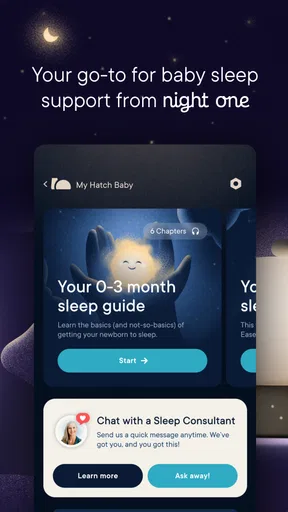
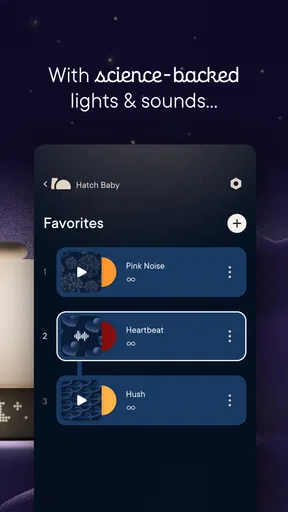
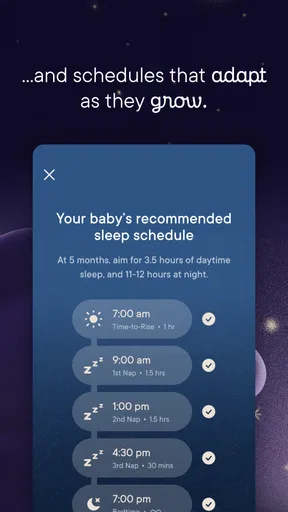

 Analysis by AppCompare
When I consider a sleep app, I want to know not only whether its sounds and routines seem useful, but also what role the phone plays in my bedtime and what choices I can make around using it. Hatch Sleep is a lifestyle app from Hatch Sleep built around preparing for sleep and waking up, rather than simply presenting a chart of how the night went. That focus can suit someone who wants a repeatable wind-down ritual, though it also makes the experience feel different from a basic meditation app or a standalone alarm.
The app is free to download and rated for Everyone. Its current version is 6.5.0, and it requires Android 10 or later. It has a 4.0 average from around 24,000 ratings, with more than a million installs. Those figures suggest that it has found an audience, but they don’t tell me whether its approach will fit a particular bedroom, schedule, or comfort level with connected devices. I’d treat them as context, not a guarantee that it will solve sleep problems.
A sleep routine is also a trust decision
Sleep is personal. A bedtime routine may involve private habits, a shared room, or a phone that someone would rather keep out of reach at night. For that reason, I judge a sleep app by the experience it offers and by the practical choices it leaves to the person using it. The developer is Hatch Sleep, and the app’s stated purpose is clear: helping people build a more sleep-friendly routine. That clarity is useful, but it shouldn’t be confused with a promise about health outcomes.
I would approach Hatch as a comfort and routine tool, not as a diagnostic service or a substitute for professional help. If ongoing sleep difficulties are affecting daily life, soothing audio and schedule adjustments may be pleasant additions, but they are not a reliable way to identify or treat an underlying medical issue. That boundary matters more to me than a confident-sounding sleep score.
Check the choices before making it a nightly habit
Before settling into a routine, I’d look at the app’s permission prompts and account options on my own device, then allow only what feels necessary for the way I plan to use it. Phone operating systems can show which access an app requests, and those prompts are a better place to make a concrete decision than assumptions based on the word “sleep.” I wouldn’t grant access simply because an app is in this category; I’d consider each request in context.
I’d also review any account and privacy controls presented during setup, and revisit them if my use changes. A person who only wants bedtime audio may have different needs from someone who wants to connect several devices or keep track of patterns. I can’t infer a company’s detailed data practices from the app’s purpose alone, so my practical advice is to read the current notices and choose the least complicated setup that still serves your routine.
Paid options and the real cost of trying it
The download is free, but in-app purchases range from $4.99 to $99.99 per item. That is a wide span, so I’d check what is included before buying anything and make sure a particular sound, routine, or other offering is worth the price to me. It’s especially sensible to explore the free experience first rather than assuming every part of the app is included at no cost.
Worth Reading Before You Choose

EA SPORTS FC Mobile 26 Is a Bigger Football Game, but It Takes Time

Flipboard Shows What News Apps Must Do Beyond the Feed

Switching to Android Auto Means Rethinking Your Driving Routine

Google Calendar Makes a Crowded Week Easier to Manage

Ludo King Makes the Most of the Minutes Between Plans

Baby Panda World Brings Quick Play to Modern Phones, but Its Game Library Feels Busy
There is a small but important trade-off here: an app designed for bedtime can invite you to spend more time on a screen just when you’re trying to wind down. I’d set up a routine earlier in the evening, when possible, and avoid browsing options once I’m already in bed. That simple habit helps keep the phone from becoming the most stimulating part of the sleep ritual.
What Makes Hatch Sleep Tick?
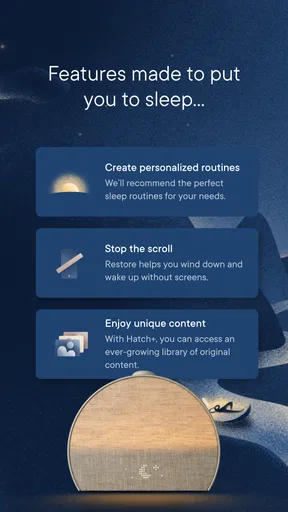
The Hatch Sleep app is more than just a sleep tracker; it's a full-fledged sleep assistant. It combines a slew of features, each aimed at improving your sleep quality. From soothing soundscapes to personalized sleep routines, this app tries to cover all bases.
Soundscapes and Meditations
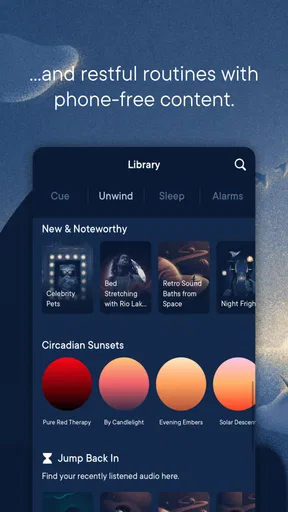
One of the standout features of Hatch Sleep is its vast library of soundscapes and meditations. Whether you’re into the sound of rain gently tapping on a window, or the calming waves of the ocean, Hatch has got you covered. I found the guided meditations particularly helpful when my mind was racing. It’s like having a meditation guru in your pocket!
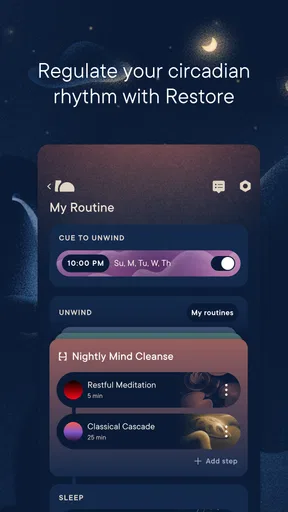
Personalized Sleep Routines
Setting up a personalized sleep routine is a breeze with this app. You can choose from a variety of options to create a pre-sleep ritual that works for you. Want to start with a meditation, follow it with some calming sounds, and finish with a bedtime story? Go for it! The flexibility here is a real plus.
Smart Alarm
Waking up to a jarring alarm can set the wrong tone for your day. Hatch Sleep’s smart alarm feature aims to change that. The alarm is designed to wake you up during your lightest sleep phase within a set window. I’ve noticed a significant difference in how I feel in the mornings—no more groggy starts!
Tracking Your Sleep
If you’re a data geek like me, you’ll appreciate the sleep tracking feature. It provides insights into your sleep cycles, helping you understand your patterns better. Over time, this data can be incredibly valuable for identifying what’s working and what’s not.
Integrations and Compatibility
Hatch Sleep integrates seamlessly with other devices, which is super convenient if you’re already invested in a smart home ecosystem. It works well with your smartphone and other Hatch products, creating a cohesive sleep environment.
Making the routine work in a real bedroom
The most useful way to test a routine is to keep it deliberately small at first. I’d choose one sound or meditation and use the same sequence for several nights before adding more steps. That makes it easier to tell whether the routine itself is calming, rather than changing several things at once and guessing which one helped. It also reduces the temptation to browse the library at bedtime.
A realistic example: after a late workday, I might start a short wind-down before getting under the covers, then let a familiar sound mark the transition from thinking about tomorrow to settling in. If another person shares the room, I’d first consider whether audio and any connected-device setup work for both of us. A routine that helps one sleeper but keeps the other awake is not a good routine, however appealing it looks in an app.
The alarm deserves its own trial rather than an instant replacement for a dependable wake-up plan. I’d use a reasonable wake window and keep a backup alarm while learning how the feature behaves in my bedroom and with my schedule. A system that aims to wake you in a lighter sleep phase can’t guarantee that every morning will feel easy; travel, late nights, and an irregular schedule can all make the result less predictable.
What the tracking can—and cannot—tell you
Sleep tracking is most useful to me as a way to notice broad patterns, not to judge a single night as a success or failure. I’d compare a few nights with similar bedtimes and routines, then look for changes that are meaningful in everyday life: whether I feel more rested, whether I’m settling down more easily, and whether a particular routine is worth keeping. A chart may prompt a question, but it should not become a reason to worry over every variation.
There is also a practical distinction between tracking and changing behavior. Seeing a pattern can be interesting, but it only helps if I use that observation to make a manageable adjustment. For example, if I notice that a long, complicated wind-down makes me put off bedtime, I’d simplify it rather than adding more steps in pursuit of a perfect routine. The app’s value is in supporting a habit, not turning rest into another performance metric.
Anyone who dislikes sleep data, finds nightly measurements stressful, or wants a clinical explanation for fatigue may be better off without tracking. A simple audio player or a paper bedtime routine can be a more comfortable choice. I’d choose the tracking feature only if the information encourages useful reflection rather than making me more alert or self-critical.
How it compares with simpler sleep tools
Compared with a basic meditation app, Hatch Sleep brings together bedtime audio, routines, an alarm, and tracking in one sleep-focused experience. That combination is its clearest advantage for someone who wants the evening wind-down and the morning wake-up to feel connected. A general meditation app may be preferable if guided practice is the only thing you need, while a standard alarm is simpler if you just want a reliable wake time and have no interest in sleep routines or patterns.
There is a trade-off in choosing an all-in-one approach: more options can make setup more involved, and some content or offerings may sit behind in-app purchases. If I already have a sound app I like and a dependable alarm, I would not switch just for the sake of having everything in one place. The better question is whether the combined routine makes my evenings easier enough to justify learning another app and checking its purchase choices.
Device connections can be appealing when a person already uses Hatch products, but I would treat compatibility as a practical consideration rather than a reason to buy additional equipment. I’d first decide what problem I’m actually trying to solve: noisy surroundings, a racing mind, an inconsistent bedtime, or difficult mornings. Then I’d test the parts of the app that match that need, instead of assuming that every available feature belongs in my routine.
Who is likely to get the most from it?
I think Hatch Sleep is best for people who enjoy gentle audio, want a repeatable pre-bed sequence, and are willing to spend a little time tailoring an experience. It may also suit someone who likes reviewing patterns, provided they can treat those observations lightly. The routines are especially useful when the same sequence can signal “day is over” even when the day itself has been busy or unpredictable.
I’d be more cautious if you need a completely screen-free approach, don’t want to create an account or connect devices, or are sensitive to anything that encourages monitoring at night. It may also be the wrong fit for someone looking for a free-only library, because paid items are available at different price points. Checking each purchase before committing is the sensible move, particularly if you only want one specific sound or routine.
For households with different sleep schedules, I’d test the setup with the other sleeper in mind. Audio preferences, alarm timing, and connected devices can affect more than one person in a shared bedroom. A phone-based routine may be convenient for one user and distracting for another, so the best arrangement is the one that respects both people’s sleep rather than maximizing the number of features in use.
Choosing how much to rely on it
What I love most about Hatch Sleep is its versatility. It feels like the app is tailored to your specific needs. Whether you need help falling asleep, staying asleep, or waking up, Hatch has tools to assist. The interface is intuitive and easy to navigate, even if you’re not tech-savvy.
Plus, the app is constantly updated with new features and sounds, so it never gets stale. It’s like having a sleep expert in your pocket, ready to help you optimize your rest.
Still, I’d keep my expectations grounded: a useful routine can make bedtime feel calmer, but no app can make a busy schedule, an uncomfortable room, or persistent sleep trouble disappear. My preferred approach is to use the smallest set of features that genuinely helps, review any account and permission choices on the device, and avoid paying for extras until I know what I’ll use. That keeps the experience under my control instead of letting a growing menu of options take over the night.
If you’re struggling with sleep, or just want to upgrade your sleep game, Hatch Sleep is definitely worth checking out. It combines modern technology with age-old sleep techniques to create a comprehensive sleep aid. The app is user-friendly and packed with features that cater to a variety of sleep needs.
The journey to better sleep starts with small changes, and Hatch Sleep provides the perfect toolkit to make those changes impactful. Download it, give it a try, and say hello to deeper, more restful nights. Sweet dreams!
Pros
- Intuitive interface
- easy to navigate.
- Customizable sleep routines for all ages.
- Wide variety of soothing sounds and music.
- Seamless integration with smart home devices.
- Offers a gentle wake-up light feature.
Cons
- Requires subscription for premium features.
- Limited free content without membership.
- Occasional syncing issues with devices.
- App can be slow on older phones.
- No offline mode for sound library.
FAQs for Hatch Sleep
What features does the Hatch Sleep app offer?
The Hatch Sleep app provides a range of features designed to improve your sleep quality. It includes customizable sleep routines, a library of soothing sounds, and a smart alarm. The app also offers meditation exercises and sleep tracking to help you monitor and enhance your sleep patterns.
Is the Hatch Sleep app compatible with all devices?
The Hatch Sleep app is available for both Android and iOS devices. Ensure your device meets the minimum operating system requirements: Android version 5.0 or later and iOS version 13.0 or later. Compatibility with specific devices can vary, so it's best to check the app store for the latest information.
Does the Hatch Sleep app require a subscription?
While the Hatch Sleep app offers a free version, it also includes a subscription model for premium features. The subscription unlocks additional content such as an expanded sound library and advanced sleep tracking. Users can choose monthly or annual plans, and the app often provides a free trial for new subscribers.
Can I use Hatch Sleep without a Hatch device?
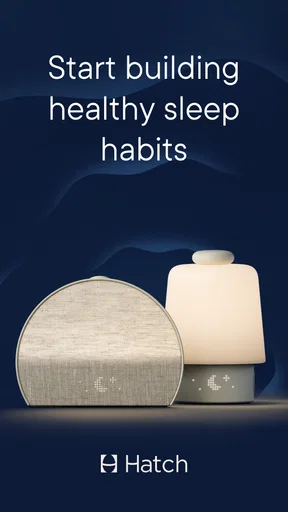
Yes, you can use the Hatch Sleep app independently without a Hatch device. However, pairing it with a Hatch Restore device enhances the experience by allowing seamless integration of light and sound for a more effective sleep environment. The app functions well on its own for basic features.
How does Hatch Sleep improve sleep quality?
Hatch Sleep improves sleep quality by creating personalized sleep routines that incorporate calming sounds, gentle wake-up alarms, and guided meditations. These features help users relax, fall asleep faster, and wake up more refreshed. The app’s sleep tracking provides insights to refine your sleep habits over time.


